Connected by Possibility

A Business in
Your SIM.

A new kind of mobile network, built for South Africa. A wallet in your SIM, non-expiring data, and real income every time your customers connect — a signature as personal as you.
NationwideCoverage from day one
24/7Support until 10pm
TPC Mobile SIM card — Your Signature Scent. Your SIM.
Why TPC Mobile

Everything a modern network should be.

Four promises, no fine print. The experience you deserve, at a price that works.

01

Wallet

Convenient transfers, right from the app — including straight to your bank.

02

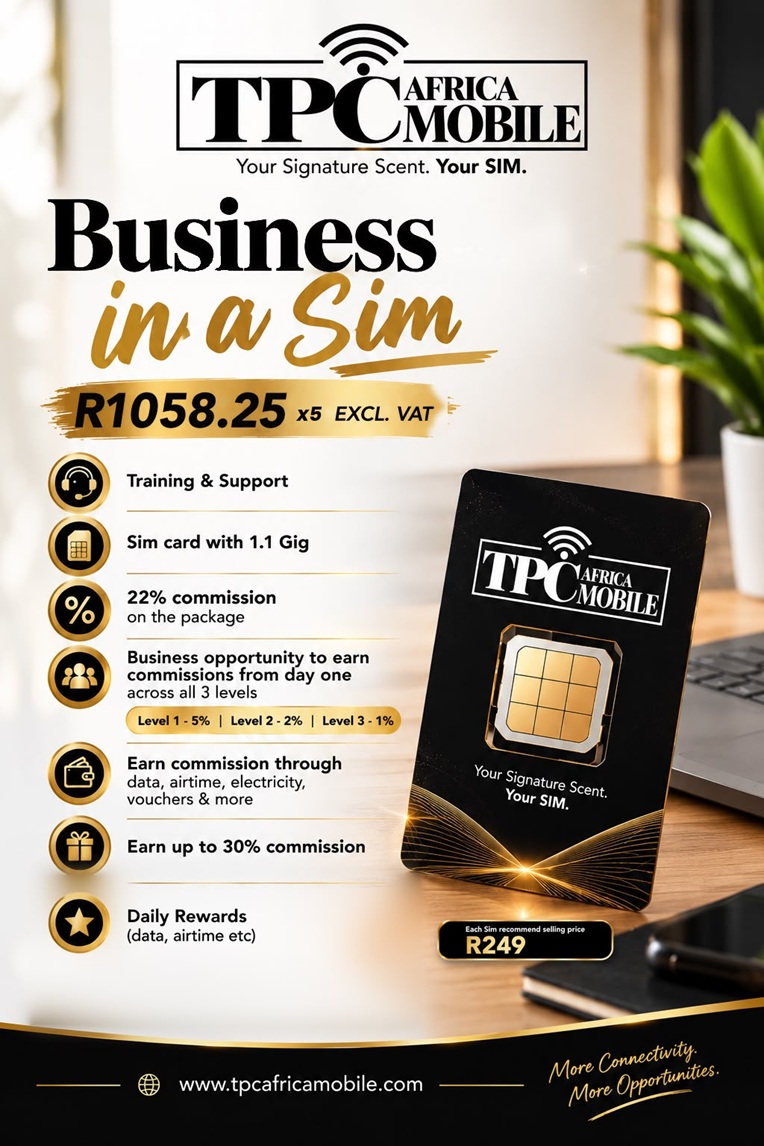
Business in a SIM

Make money as your customers use your SIM cards — your network, your margin.

03

Stay Connected

A simple app, instant RICA at any partner, and support that actually picks up — 7 days a week.

04

Non-expiring Data

Bundles that last for as long as they exist — no clock, no reset, no wasted megabytes.

How it works

Get yours in three steps.

Visit a partner, RICA with a valid ID, and insert the SIM. Signed, sealed, connected.

  1. Visit a partner

    Walk into any TPC Mobile partner store. Bring your SA ID, passport or refugee document.

  2. Register (RICA)

    Our agent registers your SIM against your ID in minutes. By law, we must RICA before activation.

  3. Insert & connect

    Pop the SIM into your phone and you're on the network. Download the app to manage everything.

  4. Download the app

    Create a username and password, verify with OTP, link your number and set up your account.

Help & FAQ

Everything you wanted to ask.

Can't find your answer? Call Customer Care on +27172000735, Monday to Sunday, 07:00 – 22:00.

Email support

A short walkthrough — RICA, insert your SIM, download the app.

How do I get a TPC Mobile SIM? +
Visit any TPC Mobile partner store with a valid SA ID, passport or refugee document. The agent will RICA your SIM in a few minutes, then insert it into your phone. You're on the network straight away.
Do I RICA before or after inserting the SIM? +
Before. Register at myrica.co.za in any mobile browser, pick the TPC Mobile tile, keep the RICA tab selected. It takes about 2–5 minutes. Only once RICA is complete, pop the SIM into your phone.
What is RICA — and why do I need it? +
RICA is South African law. Every mobile SIM must be registered against the user's ID before it can be activated. The customer must be present and we must verify your documents — about five minutes in total.
Where do I find the SIM serial number? +
On the back of the SIM card. Type only the 10 or 11 digits (e.g. 7241887315). The prefix is added for you automatically.
Why do you need my phone number during RICA? +
It's used only if we need to reach you about this RICA registration — nothing else.
How do I create a TPC Mobile app account? +
In the TPC Mobile app, tap "Create new account?" below the Sign in button, then verify with the OTP sent via SMS or WhatsApp.
I forgot my password — what do I do? +
On the sign-in screen, tap "Forgot?" next to the password field. You'll receive an OTP by SMS or WhatsApp to reset it.
The app shows someone else's username on sign-in — how do I switch? +
Sign out of that account first, or tap "Create new account?" below Sign in to use your own details.
Will TPC Mobile ever ask for my password or OTP? +
No. We never ask for your password, OTP or wallet PIN. If someone claims to be from TPC and asks, hang up and call +27172000735.
How do I buy a bundle? +
Open Top Up, choose Combos, Data, SMS, Social or Voice, pick 3-, 7-, 30-day, or Non-Expiring, then tap a bundle.
What can I do in the Wallet? +
Deposit, send and withdraw funds; top up data, airtime, SMS and voice; and pay bills. Tap "View Transactions" for your history.
How do rewards work? +
Open Rewards and choose Watch Ads or Complete Surveys. "How rewards work" inside the app explains earning and unlocking.
Will TPC Mobile work where I live? +
TPC Africa Mobile offers nationwide coverage across South Africa — from major cities to open roads. If you're unsure about your specific area, give Customer Care a call and we'll check.
Can I port my existing number? +
Yes. Look for the "Port your number" tab next to RICA on the TPC Mobile portal, or ask your partner agent when you RICA. Keep your old SIM active until the port completes.
I'm a partner — where do I log in? +
The Partner Portal is at portal.tpcamobile.co.za. Use the email and password set up for your branch. If you've forgotten your password, use Forgot Password; if a menu is missing, your role may not include it — check with your administrator.

No questions in this category yet.

Partners & Agents

Already selling TPC Mobile?

Head to the Partner Portal to manage SIM stock, RICA customers, top up your wallet and track your branch.

Urgent Escalation
TPCA Mobile Support
TPCA Mobile Support · Partner support
📞+27172000735 ✉️ info@tpcafricamobile.com